
Keep the extra bill with the purchase
Record additional buying costs against a purchase with received inventory. Retain the bill reference, amount and tax evidence.
Landed costs for your business
Allocate recorded freight and other buying costs between remaining inventory and goods already sold.
Record additional buying costs against a purchase with received inventory. Retain the bill reference, amount and tax evidence.
Allocate by value, weight or volume using the recorded product details. Confirm the quantity still held from each received line so inventory and sold-stock expense receive the appropriate portions.
The remaining-stock portion updates value through the supported valuation workflow, including FIFO handling where configured. Make the selling-price decision separately.
Review freight and other buying costs before allocating them to received stock. The interface shown below is a current product capture from the populated fictional TerminalHQ demonstration workspace.
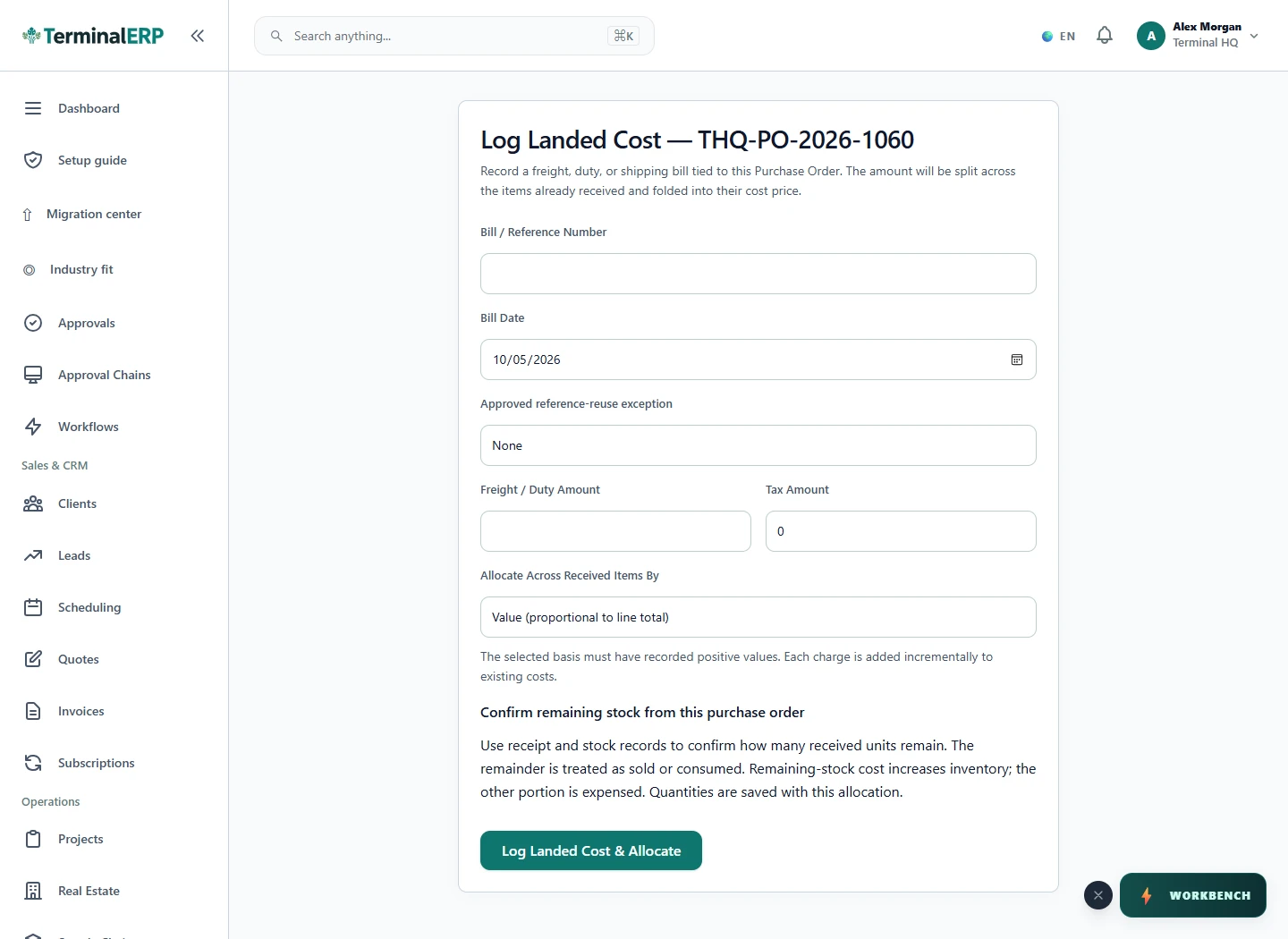
See the cost of stock held and goods already sold.
If 60 of 100 equal-value units remain when a $200 freight charge is allocated, a simplified example assigns $120 to inventory and $80 to sold-stock expense. Check actual quantities, tax and rounding before posting.
Weight and volume need the relevant measurements. Allocation does not automatically reprice the catalog or calculate customs obligations.
Compare the plans or tell us how you want to use landed costs.