
Menu
Industries

For small manufacturers

Keep production work connected to the business around it.

Use bills of materials, work orders, purchasing and stock records to organise a representative small manufacturing workflow.

Start with a reviewed recipe

Use the approved or default revision and work-order snapshot. Review shortages and location reservations before production.

Keep quality decisions recorded

Follow configured inspections, nonconformance, rework and reinspection before completion where required.

A clearer record for the work around the work

The planned build and the actual run can tell different stories. Keep the requirements, output and recorded differences available when reviewing what happened.
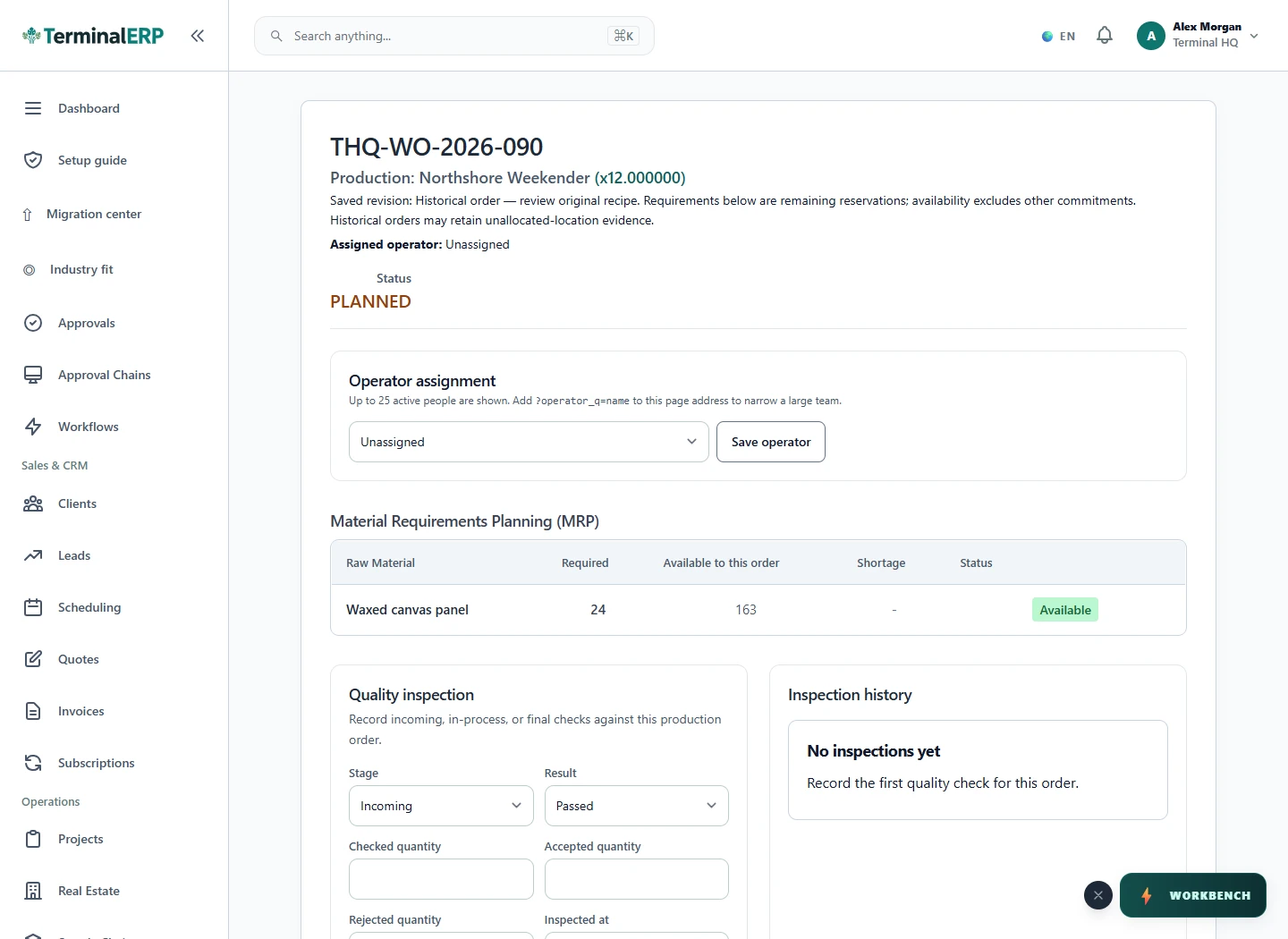
Review the materials behind the next production run.

Current TerminalERP manufacturing work order showing production quantity, status and material requirements.
Review a populated work order and its material requirements before production moves forward.
View full screen (opens in a new tab)

A working routine for your business

1. Select the reviewed recipe revision.

2. Check shortages and location reservations.

3. Record production and applicable inspections.

4. Resolve required rework before completion.

Reviewed production

Know the recipe, materials and quality behind the run.

  1. Bill of materials
  2. Prepare work order
  3. Review production
  4. Record completion
  5. Actual material use
  6. Good output and scrap
  7. Relevant cost inputs
  8. Eligible completion
  9. Actual use, good output, scrap and costs

Picture it in your working day

A workshop resolves a material shortage and records reinspection after rework before completing an order under its configured final-pass policy.

Before you choose your setup

Does every work order require a final pass?

The configured quality policy determines the gate; do not assume one rule for every order.

What if the recipe changes later?

Review the revision and snapshot attached to the work order. A later edit does not establish what an earlier order used.

A closer look at your speciality

Make-to-Order (MTO) Manufacturer

Begin with a customer requirement and a representative bill of materials, then follow the work order into its recorded output.

Process Manufacturer (Chemical / Food / Beverage)

Organise production and material records, and discuss any recipe, batch or regulatory controls your business requires.

Job Shop & Custom Fabrication

Keep the build definition and work-order result together for a custom job. Use actual material and output records to review the run.

Light Assembly & Electronics Assembly

Connect purchased components, the assembly definition and good/scrap output in one representative production example.

AI assistance

Put AI to work for your business.

Compare production costs and review the status of actual work orders.

Explore AI assistance

Choose with clarity

What this industry setup includes—and what to confirm

Start with workflows shaped around the work you do, then check the specialist and regional requirements that matter to your business.

Choosing an industry configures the workspace. It does not turn TerminalERP into a certified specialist system or prove country-specific compliance.

Relevant workflows to explore

  • BOMs & work ordersBills of materials, work orders, material use, output, inspection, and cost posting
  • Products & inventoryProduct catalog, availability, stock movements, counts, returns, and reorder attention
  • Warehouses, batches & transfersWarehouse quantities, batches, expiries, and controlled transfers
  • Suppliers & purchasingSuppliers, purchase orders, receipts, bills, payments, returns, and three-way matching
  • Invoices & customer billingInvoices, receipts, credits, returns, refunds, and payment status
  • Customers & contactsCustomer/contact records, statements, collections, and linked activity

What to confirm for your business

  • Work centers, finite-capacity scheduling, maintenance, and shop-floor terminals
  • Process recipes, yield genealogy, and specialist quality systems

Start with one workflow from your business.

Compare the plans or tell us the task you want to manage. Use a real example to decide whether the available workflow fits.